
 brothy
Chat about the note
Press c to ask a question about the open note, read the answer over the text, and jump from each mark to the words it rests on.
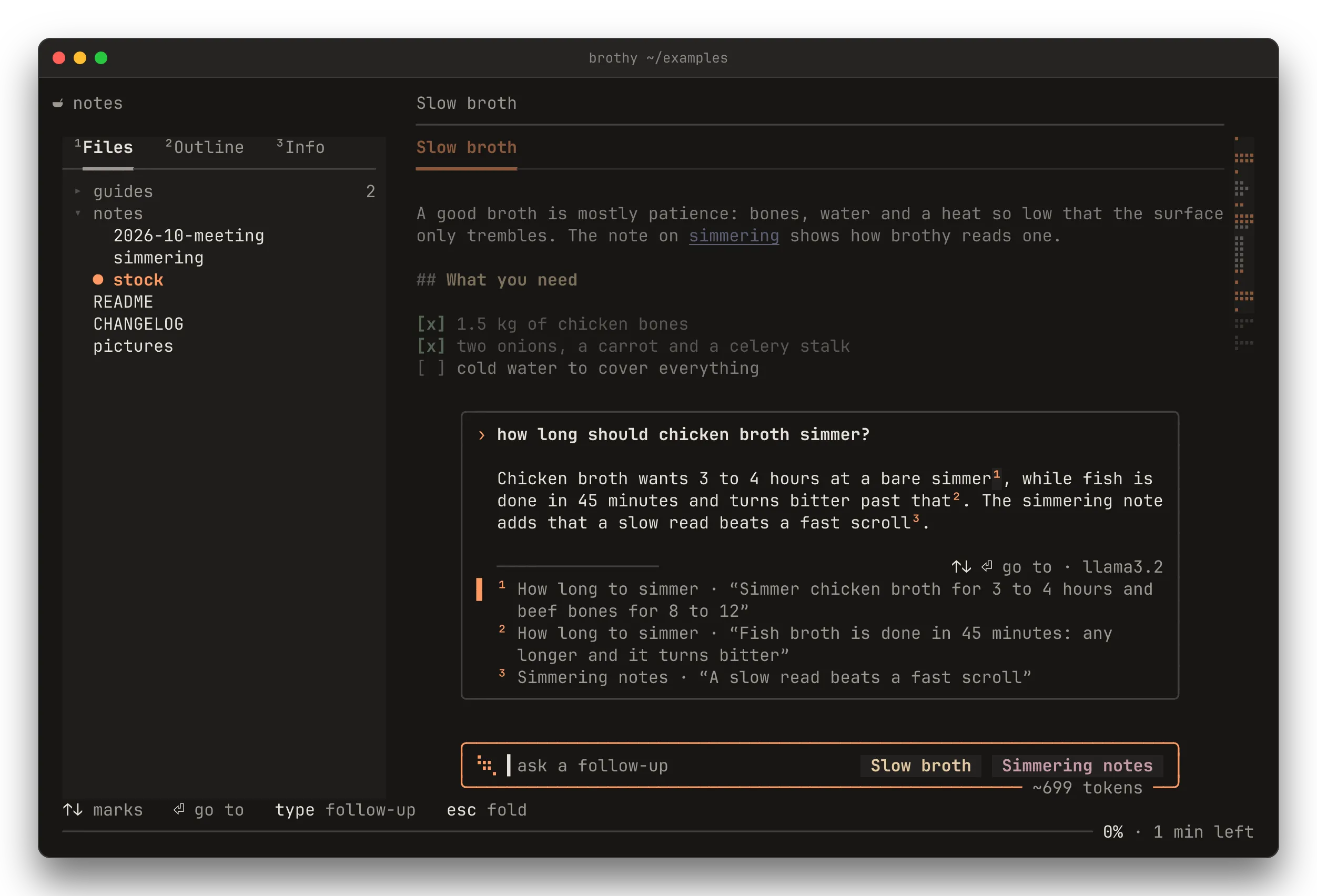
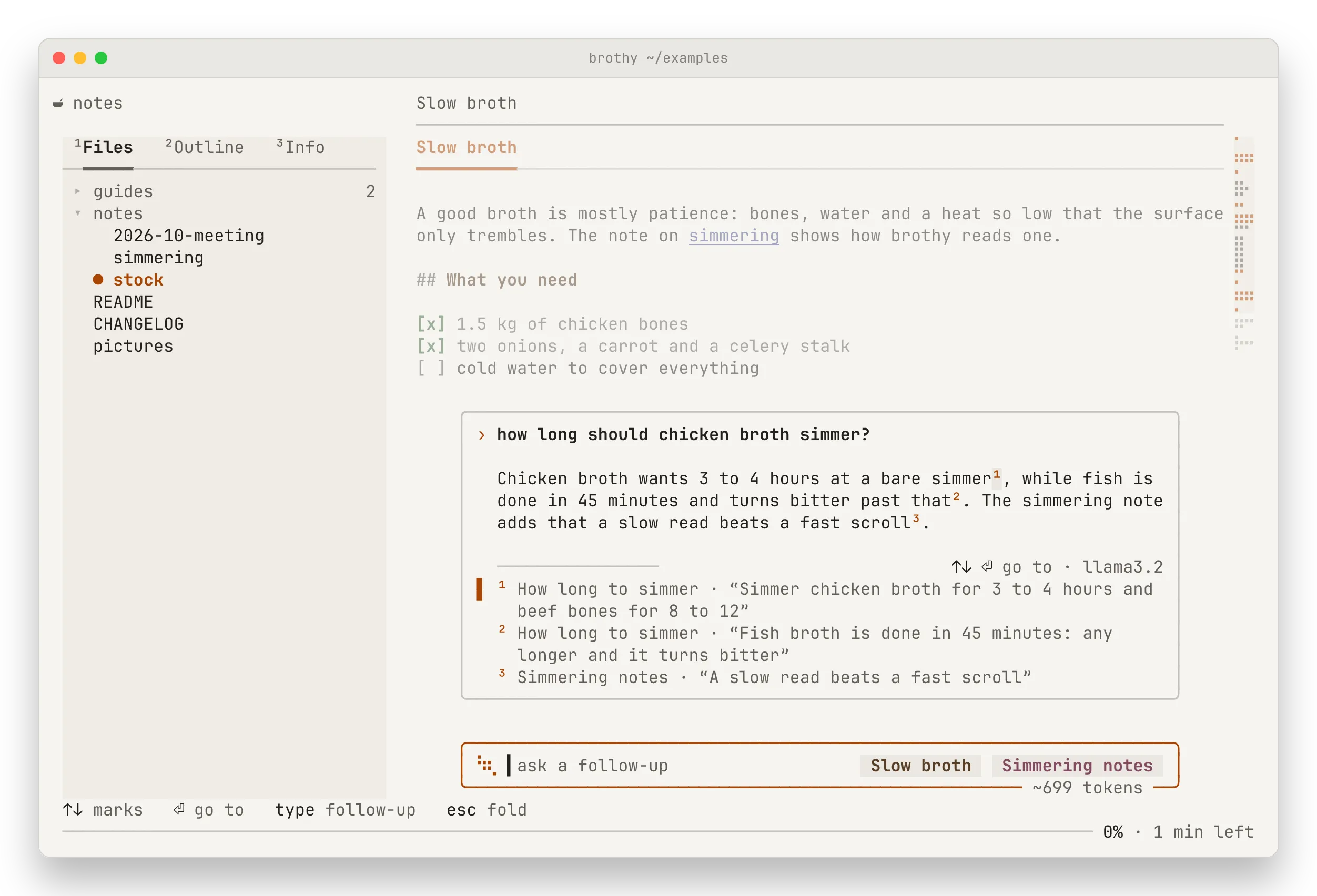
Press c to ask a question about the open note. A pill rises over the last rows of the text; type, press ⏎, and the answer appears in a card above it, with a mark ¹ ² ³ after each claim. ↑ ↓ pick a mark and ⏎ takes you to the exact words in the note that the claim rests on.
Nothing is sent until you press ⏎. Nothing is written to disk.
- With no
aiblock, c toastsAI off · set "ai" in config.jsonand no pill opens. - On an empty note it toasts
nothing to ask about. - Below 100 columns c closes an open drawer first; the pill and the drawer never show together.
- Not in zen.
The pill
Section titled “The pill”The pill is 72 columns wide at the normal 80-column measure and widens with the text column (w, or zen’s full measure), up to 100. It is centred over the last 3 rows of the text.
- On the left, a small steam wisp and the input. The placeholder reads
ask about this note…, andask a follow-uponce there is an answer. With the input empty it readsesc cancelswhile an answer runs and⏎ asks againafter a failure. - On the right, one chip per note in the thread, named by the note’s title, the same title the top line shows: the front-matter
title, else the file name. The first chip is the open note. - On the bottom border, the size of what ⏎ would send, such as
~3.1k tokens.
Adding and removing notes
Section titled “Adding and removing notes”Type [[ to add another note to the question. A small list above the caret shows up to 5 notes, ranked as you type; notes the open note links to are marked linked from here. ↑ ↓ move, tab completes the name, ⏎ adds the note and esc goes back to the input.
- ⌫ on an empty input removes the last chip. The first note cannot be removed (
chat needs a note). - A thread holds at most 6 notes.
[[with six already added toasts6 notes at mostand opens no list. - A note that is cut to fit the request has
· clippedon its chip (see Limits). - The notes are read again on every ⏎, so an edit between turns is picked up. A note deleted from disk is left out, with a toast.
The answer
Section titled “The answer”After ⏎ the card rises above the pill with one clear row between them. It holds the whole thread, oldest exchange first, pinned to the bottom. The rows of the text above the card are dimmed, and the card’s rows clear the text column. The wheel scrolls the card 3 rows; pgup pgdn move a page. When it is scrolled up, its bottom border says ↓ n more.
While the model has not answered, steam rises in the card with asking <model> · 2 s. The answer then streams in; marks are muted until they are checked.
When the answer is done, each mark that brothy could verify glows. A mark is kept only when the quote the model gave for it is found in the note, so a mark can never point at words that are not there. A claim whose quote is not found loses its mark and the others are renumbered. Under the answer, one row per mark names the section (<note> › <heading> for another note) and shows the quote.
If the model gave no usable sources, the answer is shown with no marks.
Jumping to a mark
Section titled “Jumping to a mark”↑ ↓ pick a mark and ⏎ on an empty input goes to it. If the mark belongs to another note, that note opens (H goes back). The card folds away, the page is undimmed, the quote is tinted in the text and its mark sits in the gutter. The pill holds the mark instead of the input: ¹ “do not press the bones…”, with 1 of 3 · ] next on the right.
- [ ] walk the marks of that answer (
last mark/first markat the ends). - c or a click on the pill brings the card back.
- esc hides the pill. The thread is kept.
- If the note was edited and the quote is gone, you land on its section with
quote no longer in the note.
Follow-ups, cancel and errors
Section titled “Follow-ups, cancel and errors”Type again and press ⏎ to ask a follow-up; earlier successful turns go with it. Threads are kept in memory per note, survive r and a reload, and are dropped when you switch project.
- esc while an answer runs cancels it: the exchange is removed and its question goes back into the input.
- esc on an idle card folds it into the pill; esc again hides the pill. ↑ on an empty input with no card recalls your last question.
- After a failure the card shows
✗and the reason in the error colour. Retrying happens from the card: ⏎ on an empty input asks again. A folded pill does not retry; c brings the card back. Typing a new question instead drops the failed one. - A missing key opens the pill; the error toast comes only when you press ⏎, and the input is kept. Three requests at a time at most (
AI busy · 3 requests running). - An answer that finishes while the pill is hidden is kept; if you are in another note, a toast says
answer ready · <note>. - The pill hides when you enter zen, open the drawer, or move to a note that is neither the thread’s nor the one of a mark you landed on.
Limits
Section titled “Limits”- One note sends at most 24 000 characters. Notes share what is left of your
maxCharsin chip order; a cut note shows· clipped. - Earlier turns take at most 25 % of
maxChars, oldest left out first. They stay visible in the card. - With ollama or LM Studio (
maxChars8 000 by default) the open note is clipped sooner. - An answer is cut at 6000 characters, at its last finished sentence.
- At most 6 notes in a thread.
| Key | Action |
|---|---|
| c | open the pill (or the card, when the thread has answers) |
| ⏎ | send; go to the selected mark (empty input); retry after a failure |
| [[ | add a note |
| ↑ ↓ | marks; the [[ list’s rows; ↑ on an empty input recalls your last question |
| tab | complete the [[ list’s note |
| ⌫ | a character, else the last chip |
| ctrl+u | clear the input |
| pgup pgdn | scroll the card a page (the wheel: 3 rows) |
| esc | cancel a running answer · fold the card · hide the pill |
| [ ] | folded on a mark: the previous · next mark |
While the pill has focus every other key is typed, ? and c included.